


DOC PN: 701-00082 B01
PORTAL DOC PN: 760-00731
Support Models: 500-00027; 500-00028; 500-00029; 500-00030; 500-00031; 500-00021; 500-00022; 500-00023; 500-00024; 500-00025
Last updated: April 2026
Welcome to TytoCare
This guide will walk you through:
- What's in the box
- Setting up the TytoClinic station
- Connect iPad to charger
- Secure the iPad within the holder
1. What's in the box?
- TytoPro Kit
- iPad (Optional)
- Pulse Oximeter
- Four (4) batteries for the pulse oximeter
- Blood Pressure
- Small D-Ring Cuff for BP (Blood Pressure)
- Headphones
- TytoClinic Station
- USB-C Female to Lightning (Optional)
TytoClinic Station
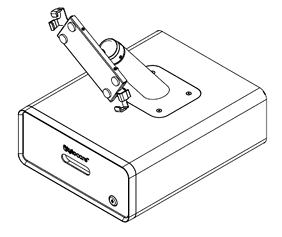
2. Setting up your TytoClinic station
Step 1: Position TytoClinic stand
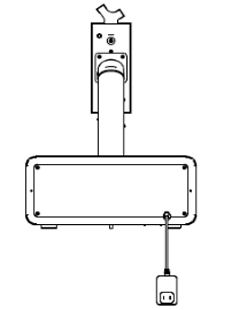
Place the TytoClinic on a stable platform ensuring it has access to an electrical outlet. Gently plug the power cord into the outlet.
Step 2: Universal Holder Unlock

Using the supplied Key Insert the key and rotate clockwise to open the Holder..
Step 3: Connect iPad to charger
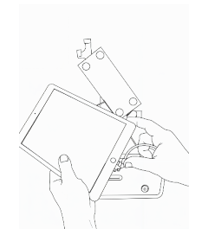
Insert the charging cable into the iPad's designated port (Type-C/Lightning).
Note: When using an iPad with a USB Type-C port, use the provided Lightning-to-USB-C adapter (located in Accessories Kit B Box). Connect the adapter as shown in the image below.
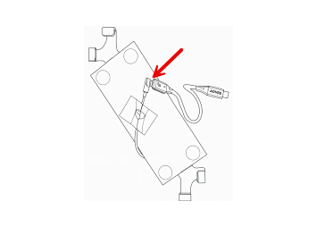
Step 4: Secure the iPad within the Holder
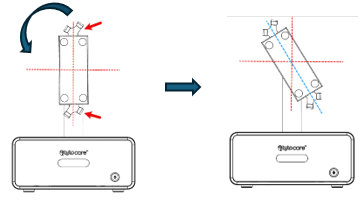
Hold the two indicated areas with both hands and rotate the holder 45° counterclockwise until it aligns with the blue dotted line.
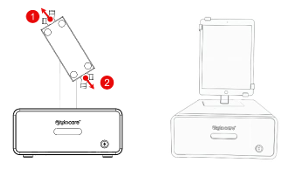
Pull the knobs toward the arrows (marked as 1 and 2) and place the iPad into position.
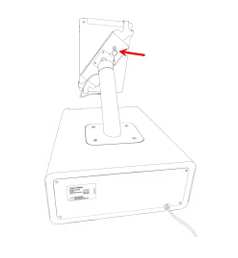
Use the provided Key to lock the iPad inside the holder. .
3. Configure the iPad
The first time you turn on the iPad, you will be prompted to configure it. Ensure you use the settings provided below.
- Initial Setup: Tap "Next" and select "English" and "United States".
- Wi-Fi Connection: Connect to the newly created Wi-Fi network on the iPad.
- Touch ID & Passcode: Select "Set Up touch ID later" and "Don't Use Passcode".
- Apps & Data: Select "Set Up as New iPad".
- Apple ID: Choose "Set Up Later in Settings" and then "Don't Use".
Additional information
TytoClinic station power inlet/outlets:
- Outlet of frame: USB Type C / Lightning cables for charging the iPad
- Outlet inside drawer: USB type C for charging the TytoPro device
TytoClinic station weight:
~24 pounds (~10.96kg)
TytoClinic station measurements
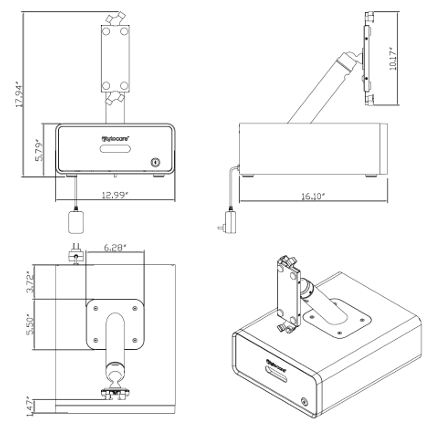
- Height (Total): 17.94"
- Base Width: 12.99"
- Base Depth: 16.10"
- iPad Holder Height: 10.17"

