


Throughput measures the real-time data processing speed of your network, indicating how many concurrent telehealth sessions your connection can reliably support.
What is Throughput?
This test estimates network capacity by sending data payloads (1,024 bytes) via TURN servers using the SCTP protocol. It provides a baseline for how quickly your device sends and receives data within the tested infrastructure.
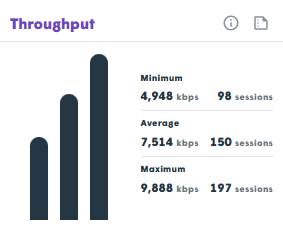
Session Calculation Logic:
- G.711 Codec: Requires ~100kbps per session.
- Opus Voice: Requires ~50kbps per session.
Data Collected and Shared
| Metric | Description |
|---|---|
| Maximum | The peak data transfer rate achieved during the test. |
| Average | The mean speed maintained throughout the test duration. |
| Minimum | The lowest throughput recorded, indicating potential dips in connection. |
Performance Thresholds
| Metric | Good | Mediocre | Bad |
|---|---|---|---|
| Bitrate (Min/Avg/Max) | Above 4 sessions | 1–4 sessions | Below 1 session |
| Difference (Variance) | Below 20% | 20–50% | Over 50% |
*Difference refers to the variance between Average/Minimum or Maximum/Average speeds.

