


Widget Results & Importance
This test ensures that your browser can successfully resolve and reach the specific servers required for TytoCare operations. While not always directly linked to the WebRTC video stream, these servers handle authentication, data storage, and session management.
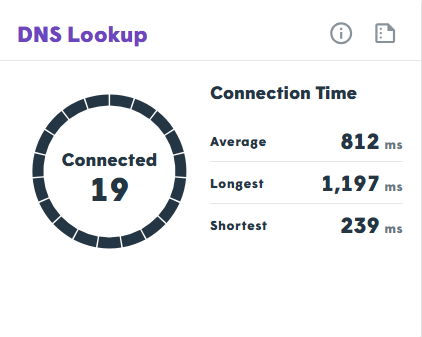
- Connectivity: If any address shows as unreachable, specific parts of the TytoCare service (like logging in or uploading exams) may fail.
- Performance: The widget logs connection times; high latency here often suggests routing issues within your local network or ISP.
Technical Metrics
| Metric | Definition |
|---|---|
| Connected | Success rate: The number of addresses reached out of the total attempted. |
| Average Connection Time | The mean speed of the server handshakes. |
| Highest/Shortest Time | The peak and minimum latency observed during the lookup process. |
FAQ: Troubleshooting DNS Issues
Q: What does a "Blocked" address mean?
A: It means the DNS server resolved the IP, but your network could not establish a connection. This is a primary indicator of a firewall blockage.
Q: How long does the test try to connect?
A: There is a 5-second timeout. If a response isn't received within this window, the address is marked as blocked.
Q: What should I do if addresses are unreachable?
A: Provide the failed addresses from the test log to your IT department. They will likely need to whitelist these domains in the corporate firewall or web filter.
Admin Note: DNS issues are often intermittent. If you see high "Highest Connection Time" values, check if your internal DNS servers are under heavy load or if there is a regional ISP outage.

