


You can share a patient’s visit, including all recorded exams, with a colleague for a medical consultation. The recipient does not need to be a registered TytoCare user.
How to Share a Visit
- Select the Visit: Choose the specific patient visit you wish to share.
- Open Sharing Screen: Click the Share icon in the upper-right corner of the interface.

- Enter Recipient Details: In the "Share Recorded Exams" window, provide the first name, last name, and email address of your colleague.
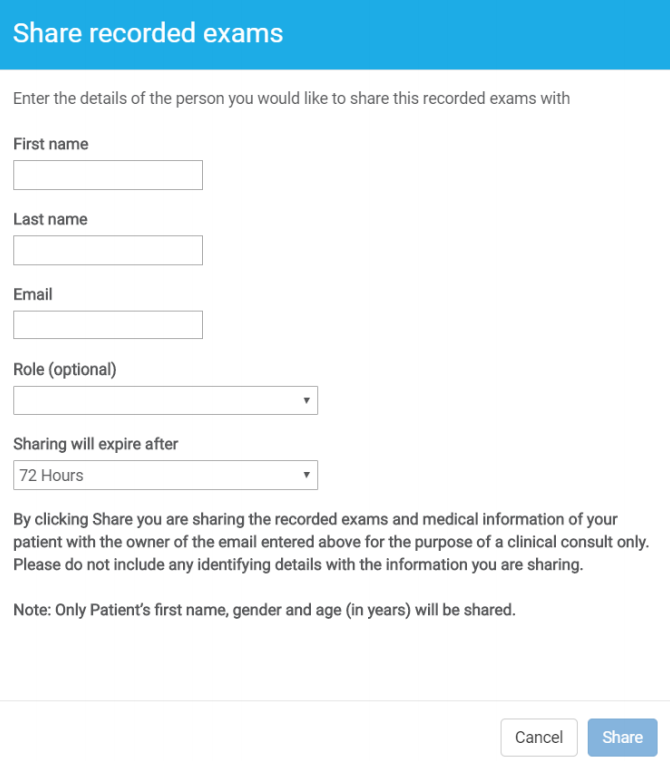
- Set Role (Optional): Select the medical role of the shared person if desired.
- Set Expiration: By default, the link is valid for 72 hours. You may adjust this to 24 hours or 7 days.
- Send: Press Share to send the email link.
Security & Privacy
- Limited Data: To prevent patient identification, only the first name, gender, and year of birth are shared. Please ensure the recorded exams themselves do not contain identifying data.
- Verification: Ensure the recipient is authorized to view this medical information and is the owner of the email address provided.
- Security Code: Upon clicking the link, the recipient must enter a unique security code sent to their email to gain access.
Canceling Shared Access
To revoke access, select the shared visit and click the Share icon again. At the bottom of the window, you will see who the visit was shared with. Select Cancel all sharing of this visit and confirm by clicking Yes.

